API Reference
Complete reference for all public types, methods, properties, and events in Threader. For walkthroughs and examples, see the per-topic pages. This page is the definitive source for signatures and behaviour details.
DialogueManager
DialogueManager : MonoBehaviour
Singleton. Add one to your scene. All interaction with the dialogue system goes through this class.
Singleton access
DialogueManager.Instance // null when no manager exists in the scene
Inspector fields
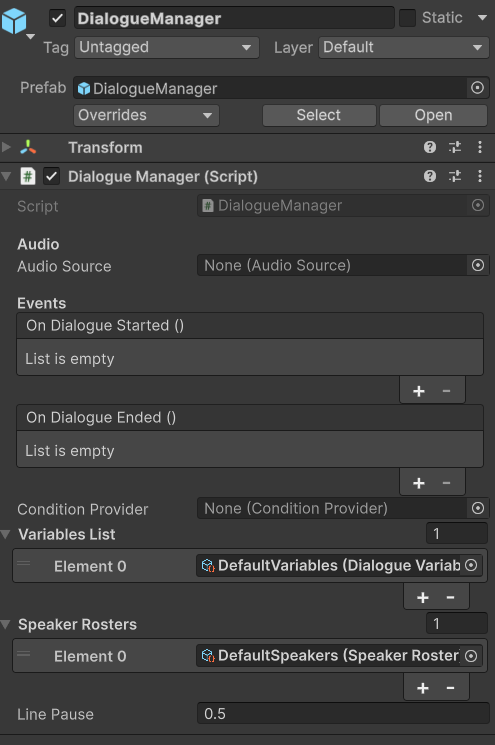
| Field | Type | Description |
|---|---|---|
audioProviderOverride |
MonoBehaviour |
Custom audio backend. Assign any MonoBehaviour that implements IDialogueAudioProvider (e.g. FMODAudioProvider, WwiseAudioProvider). Leave empty to use the built-in UnityAudioProvider, which is created automatically. |
conditionProvider |
ConditionProvider |
Optional. Assigned providers are forwarded to ConditionService.SetProvider in Awake. |
_variablesList |
List<DialogueVariables> |
Assets searched in order for variable lookups. Exposed as VariablesList. |
_speakerRosters |
List<SpeakerRoster> |
Assets that populate speaker dropdowns in the editor. Exposed as SpeakerRosters. |
_barkSpeakerRosters |
List<BarkSpeakerRoster> |
Assets that populate the per-graph Bark Speakers picker used by BarkNPCNode. Exposed as BarkSpeakerRosters. See Bark System — multi-speaker barks. |
_languageLibrary |
LanguageLibrary |
Optional. Central language list. When assigned, graph Inspector language slots are driven by the library instead of free-text entry. Exposed as LanguageLibrary. |
linePause |
float |
Seconds to wait after each NPC line before advancing. Default: 1. |
OnDialogueStarted |
UnityEvent |
Inspector-wired event fired when dialogue starts. |
OnDialogueEnded |
UnityEvent |
Inspector-wired event fired when dialogue ends. |
Events (C# subscriptions)
Subscribe in OnEnable, unsubscribe in OnDisable.
// Each dialogue line as it becomes current.
event Action<NPCLine> OnNPCLine;
NPCLine.SpeakerName— resolved speaker name (graph default applied when the node's Speaker field is blank)NPCLine.Text— fully resolved text (variable tokens already substituted)
// Each Player Node line as it becomes current. Fired instead of OnNPCLine for Player Node.
event Action<NPCLine> OnPlayerLine;
- Same
NPCLinestruct asOnNPCLine.NPCLine.SpeakerNameresolves fromSpeakerRoster.PlayerName(viaGetPlayerName(), default"Me") since Player Node has no Speaker field of its own. - Follows the same line-advance contract as
OnNPCLine(waits on audio /DialogueUI.IsTyping/linePause). See UI — Player Node lines.
// Every node event fired from any NPC node or Player Node (local + global).
event Action<string> OnNodeEvent;
Guard with CurrentActor to scope handling to a specific NPC:
manager.OnNodeEvent += key => {
    if (manager.CurrentActor != myNpc) return;
    HandleEvent(key);
};
// Only events marked Global on the NPC node.
event Action<string> OnGlobalNodeEvent;
No actor guard needed — these are intentionally broadcast to all listeners.
// A Player Choice node has become active.
// The list contains all choices, including those with IsHidden = true.
// Custom UIs must filter out IsHidden = true entries before rendering.
event Action<List<ChoiceData>> OnChoiceNode;
Each ChoiceData in the list:
- Text — resolved display text
- IsLocked — true if unfulfilled non-hiding conditions; show greyed out
- IsHidden — true if a hiding condition failed (choice is not shown to player)
- ChoiceKey — "{nodeGuid}:{index}" for history lookups
// Dialogue has fully ended (after End node is processed).
event Action OnDialogueEnd;
// Dialogue is starting. Also fires OnDialogueStarted (UnityEvent) in parallel.
event Action OnDialogueStartedEvent;
// A bark line has become active (fired instead of OnNPCLine for bark graphs).
event Action<NPCLine> OnBark;
Wire this to a world-space speech bubble, HUD ticker, or any component that should display ambient NPC lines. Bark output never reaches OnNPCLine or the main dialogue panel.
Properties
| Property | Type | Description |
|---|---|---|
Instance |
DialogueManager |
Static singleton reference |
CurrentActor |
IDialogueActor |
The actor currently running dialogue. null between conversations. |
IsDialogueActive |
bool |
true while dialogue is running (blockables are blocked) |
CanCancel |
bool |
true while dialogue is active and the current node does not have Prevent Dialogue Exit enabled |
ActiveLanguage |
string |
The currently active language for line sheet resolution. Set via SetActiveLanguage(). |
ConditionProvider |
ConditionProvider |
The provider assigned in the Inspector (read-only) |
VariablesList |
IReadOnlyList<DialogueVariables> |
All assigned variable assets |
SpeakerRosters |
IReadOnlyList<SpeakerRoster> |
All assigned roster assets |
LanguageLibrary |
LanguageLibrary |
The Language Library assigned in the Inspector. null if not set. |
Methods
void StartDialogue(DialogueGraph graph, string entryPointKey = null, IDialogueActor actor = null)
Starts a dialogue. Resolves the entry point, fires OnDialogueStarted, blocks all registered blockables, then starts the runner. If any registered IDialogue also implements IDialogueReady, the runner waits until IsDialogueReady is true on all of them.
graph— must not be nullentryPointKey— empty/null = default start nodeactor— passed to the runner so End nodes can callactor.SetEntryPoint()
void SelectChoice(int index)
Tells the runner which choice the player made. Call from your choice button callbacks. index is the 0-based position in the list passed to OnChoiceNode. Calling with an out-of-range index logs an error and is ignored.
void CancelDialogue()
Immediately ends active dialogue — stops all coroutines and audio, then fires OnDialogueEnd and OnDialogueEnded. No-op if no dialogue is running or if the current node has Prevent Dialogue Exit enabled. Safe to call from any UI button or key handler.
void PlayBark(DialogueGraph graph, Transform actorTransform = null, string speakerName = null)
Runs a bark graph on a second non-blocking runner. The main conversation runner is completely unaffected — barks never block the player or fire OnDialogueStarted. Each line fires OnBark instead of OnNPCLine.
graph— must haveIsBarkset totrue; passing a normal dialogue graph logs a warningactorTransform— optional; used for 3D audio positioning. May benullfor 2D audio.speakerName— optional; the third-level fallback in the bark speaker resolution chain (node speaker → graph default → this name).BarkSourcepasses its Speaker Name field automatically. Use this when callingPlayBark()from code to ensure correct line sheet lookup.
void RegisterBlockable(IDialogue blockable)
void UnregisterBlockable(IDialogue blockable)
Register/unregister a component to receive Block() and Unblock() calls when dialogue starts and ends. Also used for IDialogueFocus (camera) and IDialogueReady (transition gate). Call Register in OnEnable and Unregister in OnDisable.
string GetPlayerName()
Returns the first non-empty Player Name across all assigned SpeakerRosters, falling back to "Me" if none is set. Used to fill NPCLine.SpeakerName for OnPlayerLine.
void RegisterSpeaker(string name, Transform t)
void UnregisterSpeaker(string name)
Register a named speaker. The name must match the Speaker Name field on NPC nodes in the graph. Used to:
- Position spatial audio at the speaker's world location
- Direct IDialogueFocus to look at the correct NPC mid-dialogue
NPCDialogue calls RegisterSpeaker in Start automatically. For DialogueTrigger, you do not need to register manually (it uses the trigger's own transform as a fallback). Register manually only for NPCs added dynamically at runtime.
void SetBlocked(bool value)
Manually block or unblock all registered blockables. Call if you need to freeze the player for reasons other than dialogue (e.g. a cutscene that runs alongside dialogue). Normally called internally.
void SetActiveLanguage(string language)
Sets the active language for line sheet resolution. When a language is set, DialogueManager calls graph.GetSheet(activeLanguage) to retrieve the language-specific sheet for each graph. The sheet's PreviewText fields provide localised NPC line text, and the sheet's audio clips provide language-specific VO.
Call once from your language/settings menu — the setting persists for the lifetime of the DialogueManager instance.
DialogueManager.Instance.SetActiveLanguage("French");
Audio behaviour
All audio playback is routed through an IDialogueAudioProvider. By default, DialogueManager creates a UnityAudioProvider automatically in Awake. To use a different backend (FMOD, Wwise, custom), assign a component implementing IDialogueAudioProvider to the Audio Provider Override field.
- When a line has an audio clip or a
LineKey,_audio.Play(clip, lineKey, speakerName, position)is called. If the speaker's transform is registered,positionis that speaker's world position (3D spatial); otherwisenull(2D). - The runner then waits with
WaitWhile(() => _audio.IsPlaying && !DialogueUI.SkipLineRequested). Custom providers must return the correctIsPlayingstate for this to work correctly. - If a skip is requested mid-line,
_audio.Stop()is called immediately.linePauseis applied after the clip ends (also skippable). - When neither a clip nor a
LineKeyexists for a line, the runner waits forDialogueUI.IsTypingto become false, then waitslinePauseseconds before advancing.
See IDialogueAudioProvider and UnityAudioProvider below.
IDialogueActor
public interface IDialogueActor
{
    DialogueGraph Graph               { get; }
    string        ActiveEntryPointKey { get; }
    string        SpeakerName         { get; }

    void SetEntryPoint(string key);
    void ResetEntryPoint();
    void StartDialogue();
}
Implemented by NPCDialogue and DialogueTrigger. Implement on your own components if you have a custom interaction system. Gives quest scripts, cutscene scripts, and save systems a stable interface that doesn't depend on which NPC component is used.
| Member | Description |
|---|---|
Graph |
The DialogueGraph this actor runs. |
ActiveEntryPointKey |
Current entry point override. Null/empty = start node. |
SpeakerName |
The speaker name for this actor. Used as the third-level fallback in sub-graph speaker resolution. |
SetEntryPoint(key) |
Switches the active branch for the next StartDialogue call. |
ResetEntryPoint() |
Clears the override (sets to null). |
StartDialogue() |
Starts dialogue from ActiveEntryPointKey. |
See Entry Points for patterns and save/restore detail.
IDialogue
public interface IDialogue
{
    void Block();
    void Unblock();
}
Implement on any component that should pause when dialogue is active — player movement, hotkeys, game menus, etc. Register with DialogueManager.RegisterBlockable.
IDialogueFocus
public interface IDialogueFocus
{
    void FocusOn(Transform target);
    void ReleaseFocus();
}
Implement alongside IDialogue on your player camera controller. When Look At Speaker is enabled in the Graph Editor sidebar and a speaker transform is registered, FocusOn is called each time a new NPC node is reached. ReleaseFocus is called when dialogue ends.
IDialogueReady
public interface IDialogueReady
{
    bool IsDialogueReady { get; }
}
Implement alongside IDialogue when your blockable needs a moment to complete a transition (a camera cut, a fade-in) before the first line is displayed. DialogueManager.StartDialogue waits on WaitUntil(() => IsDialogueReady) for every registered blockable that also implements this interface before starting the runner.
IDialogueAudioProvider
public interface IDialogueAudioProvider
{
    void  Play(AudioClip clip, string lineKey, string speakerName, Vector3? worldPosition);
    void  Stop();
    bool  IsPlaying { get; }
    float Volume    { get; set; }
}
The audio abstraction layer. Implement this on a MonoBehaviour to replace Threader's default Unity AudioSource playback with any backend — FMOD, Wwise, a custom streaming system, or a silent stub for testing.
| Member | Description |
|---|---|
Play(clip, lineKey, speakerName, worldPosition) |
Begin playback. clip may be null when using a middleware backend that resolves audio from lineKey. lineKey is the Line Key set in the Line Sheet editor, or the Audio Event Key on a Play Audio node — both may be empty for Unity-only projects. worldPosition is the speaker's world position for 3D spatial audio, or null for 2D. |
Stop() |
Stop all playback immediately. Called on dialogue cancel, line skip, and dialogue end. |
IsPlaying |
Must return true while audio is still playing. DialogueManager uses WaitWhile(() => _audio.IsPlaying) to hold the coroutine until the line finishes. Returning incorrect state here will cause lines to cut short or hang. |
Volume |
Master volume (0–1). Applied when Play is called. |
Wiring a custom provider
- Create a
MonoBehaviourthat implementsIDialogueAudioProvider. - Add it as a component on the same
GameObjectasDialogueManager. - Drag it into the Audio Provider Override slot on the
DialogueManagercomponent.
If no override is assigned, DialogueManager.Awake calls gameObject.AddComponent<UnityAudioProvider>() automatically so existing projects need no changes.
Sample providers
Assets/Threader/Samples/ contains ready-to-use reference implementations:
| File | Backend | Requires |
|---|---|---|
FMOD/FMODAudioProvider.cs |
FMOD Studio | FMOD for Unity (FMOD_INSTALLED define) |
WWISE/WwiseAudioProvider.cs |
Wwise | Wwise Unity Integration (AK_WWISE_UNITY_INTEGRATION define) |
Both files are wrapped in #if guards and compile to nothing when the middleware is not installed. See Audio — Using a middleware provider for full setup instructions.
UnityAudioProvider
UnityAudioProvider : MonoBehaviour, IDialogueAudioProvider
The default IDialogueAudioProvider. Created automatically by DialogueManager when no override is assigned. Can also be added manually via Add Component → Threader → Unity Audio Provider.
Inspector fields
| Field | Type | Description |
|---|---|---|
_2dSource |
AudioSource |
2D fallback source for lines with no known speaker position. Created automatically on the same GameObject if not assigned. |
_volume |
float |
Master volume (0–1). Applied to both sources when Play is called. |
Behaviour
- When
worldPositionis provided, a hidden childGameObjectwith a spatialAudioSource(spatialBlend = 1,rolloffMode = Linear) is repositioned to that world position and used for playback. - When
worldPositionisnull, the 2D source is used. IsPlayingpolls whichever source is currently active.Playis a no-op whenclipisnull— if you only have alineKeyand no clip, use a middleware provider instead.
NPCDialogue
NPCDialogue : MonoBehaviour, IDialogueActor
Drop on an NPC GameObject for code-driven interaction (the dialogue is started by your own input system rather than a trigger collider).
Inspector fields
| Field | Type | Description |
|---|---|---|
graph |
DialogueGraph |
The graph this NPC runs. |
speakerName |
string |
Must match the Speaker Name set on NPC nodes. Registers this transform with DialogueManager.RegisterSpeaker. |
IsInteractable |
bool |
Public flag for your input system to check before calling StartDialogue. Not enforced internally. |
NodeEvents |
List<NodeEventResponse> |
Per-key UnityEvent responses for node events fired during this NPC's dialogue. |
Methods
| Method | Description |
|---|---|
StartDialogue() |
Calls DialogueManager.Instance.StartDialogue(graph, _activeEntryPointKey, this). |
SetEntryPoint(string key) |
Stores key for next StartDialogue. |
ResetEntryPoint() |
Clears the stored key. |
NPCDialogue subscribes to DialogueManager.OnNodeEvent in Start(). When an event fires with a key matching an entry in NodeEvents, the corresponding UnityEvent is invoked. This allows per-NPC event responses without any custom C#.
DialogueTrigger
DialogueTrigger : MonoBehaviour, IDialogueActor
Drop on an NPC with a trigger Collider. Handles collision detection and player input natively.
Inspector fields
| Field | Type | Description |
|---|---|---|
graph |
DialogueGraph |
The graph to run. |
playerTag |
string |
Tag that identifies the player. Default: "Player" |
interactKey |
KeyCode |
Key to press when in range. Default: E. Ignored if startOnEnter is true. |
startOnEnter |
bool |
Start dialogue immediately when player enters trigger zone. |
interactPrompt |
GameObject |
Optional UI prompt shown when player is in range (e.g. "Press E"). |
activeEntryPointKey |
string |
Serialized in the scene. Edit at design time to start partway through a graph. |
Validation
On Start(), ValidateSetup() runs:
- Warns if no trigger Collider or Collider2D found on this or children
- Warns if no Rigidbody or Rigidbody2D found (required for OnTriggerEnter)
- Warns if no DialogueGraph assigned
Methods
void TriggerDialogue()
Safe to call from a UnityEvent, animation event, or external script. Guards against null manager/graph and logs errors if either is missing.
DialogueGraph
DialogueGraph : ScriptableObject
Create via Assets → Create → Threader → Graph → Dialogue Graph.
Inspector fields
| Field | Type | Description |
|---|---|---|
Nodes |
List<DialogueNode> |
All nodes in the graph (SerializeReference) |
StartNodeGuid |
string |
GUID of the default start node |
DefaultSpeakerName |
string |
Fallback speaker name for NPC nodes with no speaker override |
LookAtSpeaker |
bool |
When true, calls IDialogueFocus.FocusOn on the speaking NPC's transform. Set via the Look At Speaker toggle in the Graph Editor sidebar. Hidden in the editor when IsBark is true. |
IsBark |
bool |
When true, this graph is treated as a bark graph. Set via the Graph Type dropdown in the DialogueGraph Inspector (asks for confirmation if the graph already has nodes). PlayBark() requires this to be true. |
BarkSpeakers |
List<string> |
Per-graph filtered subset of speaker names (from assigned BarkSpeakerRoster assets) that this bark graph's BarkNPCNodes can use. Populated via the graph editor's SPEAKERS sidebar section. Only relevant when IsBark is true. See Bark System. |
EntryPoints |
List<DialogueEntryPoint> |
Named entry points. Set via right-click in the editor. |
Groups |
List<DialogueGroupData> |
Comment boxes (editor-only) |
StickyNotes |
List<StickyNoteData> |
Sticky notes (editor-only) |
LineSheets |
List<NamedLineSheet> |
Per-language line sheet assignments. Each entry pairs a language string with a DialogueLineSheet asset. See Line Sheet — Multi-language support. |
Methods
string ResolveEntryPointGuid(string key)
Returns the node GUID for key. Falls back to StartNodeGuid if key is null, empty, or not found. Logs a warning (not an error) on fallback when a non-empty key was supplied. Called by DialogueManager.StartDialogue.
DialogueLineSheet GetSheet(string language)
Resolves the line sheet for the given language. If LineSheets is empty, falls back to the legacy single LineSheet field. If language is non-empty and a matching entry exists, returns that sheet. If no match is found or language is null/empty, returns the first sheet in the list (the default language). Returns null only when no sheets are configured at all. Called internally by DialogueManager when resolving audio clips and localized text for each NPC line. See Translation — GetSheet fallback chain.
NamedLineSheet
[Serializable]
public class NamedLineSheet
{
    public string Language;
    public DialogueLineSheet Sheet;
}
Pairs a language identifier with a DialogueLineSheet asset. Stored in DialogueGraph.LineSheets. The Language string is matched against DialogueManager.ActiveLanguage at runtime.
LanguageLibrary
LanguageLibrary : ScriptableObject
Create via Assets → Create → Threader → Lines → Language Library.
| Field | Type | Description |
|---|---|---|
Languages |
List<string> |
Ordered list of language names. The first entry is the default/primary language. |
Assign to DialogueManager to drive language slots on all graph Inspectors. When a library is present, the Graph Editor shows one read-only row per library language instead of free-text entry. See Translation — Language Library.
BarkSource
BarkSource : MonoBehaviour
Add to any NPC GameObject (alongside NPCDialogue) to automate bark playback without any C#. Calls DialogueManager.PlayBark() based on the configured trigger mode.
Inspector fields
| Field | Type | Description |
|---|---|---|
barkGraph |
DialogueGraph |
The bark graph to play. Must have IsBark = true. |
triggerMode |
TriggerMode |
OnEnter — fires when the player enters the trigger collider. OnTimer — fires on an interval. Manual — call Bark() from script. |
playerTag |
string |
Tag used to identify the player for OnEnter trigger mode. Default: "Player". |
cooldown |
float |
Minimum seconds between barks. Default: 8. Prevents rapid repeat firing regardless of trigger mode. |
speakerName |
string |
The speaker name this NPC is registered under. Must match their NPCDialogue Speaker Name. Used for line sheet audio clip and animator action lookup, and to select this NPC's entry on any BarkNPCNodes in the graph. Shown as a dropdown scoped to the bark graph's BarkSpeakers list. |
randomiseSpeaker |
bool |
When true, Start() overwrites speakerName with a random entry picked from the bark graph's BarkSpeakers list. |
suppressDuringDialogue |
bool |
When true (default), barks are silently skipped while a full conversation is active. |
Methods
void Bark()
Manually triggers the bark. Safe to call from a UnityEvent, animation event, or external script. Respects cooldown and the suppressDuringDialogue setting.
DialogueVariables
DialogueVariables : ScriptableObject
Create via Assets → Create → Threader → Variables → Variables Store.
Inspector fields
| Field | Type | Description |
|---|---|---|
Variables |
List<DialogueVariable> |
Design-time defaults. Each entry has Name, Type, DisplayName, and a value field. |
Methods
void InitRuntime()
Copies design-time defaults into runtime dictionaries. Call explicitly to reset all variables (new game). Called automatically on first access if not called manually.
bool   GetBool(string name)
int    GetInt(string name)
string GetString(string name)
Returns the current runtime value. Default: false, 0, "" if the name is not found. Calls EnsureInit() automatically.
void SetBool(string name, bool value)
void SetInt(string name, int value)
void SetString(string name, string value)
Writes to the runtime dictionary. Logs a warning if the name doesn't exist in the design-time list or if the type doesn't match. Calls EnsureInit() automatically.
string GetDisplayName(string name)
Returns DialogueVariable.DisplayName if non-empty, otherwise returns name. Used by {varName:name} text substitution tokens.
VariableType? GetVariableType(string name)
Returns the type enum, or null if the name is not in the design-time list.
string GetValueAsString(string name)
Returns the current runtime value as a string, or "(not found)" if the name doesn't exist.
Runtime lifecycle
- Runtime dictionaries are private, non-serialized. Play-mode changes never write back to the
.assetfile. - When the asset is unloaded (
OnDisable),_initialisedis reset tofalse— the next access callsInitRuntimeagain from defaults. - Multiple
DialogueVariablesassets can be assigned toDialogueManager.VariablesList. Variable name lookups search assets in list order. If two assets have the same name, only the first is found.
SpeakerRoster
SpeakerRoster : ScriptableObject
Create via Assets → Create → Threader → Speakers → Speaker Roster.
| Member | Description |
|---|---|
Speakers |
List<string> — all canonical speaker names |
PlayerName |
string — display name for Player Node lines (default "Me"). Read via DialogueManager.GetPlayerName(), which checks all assigned rosters in order and uses the first non-empty value. |
bool Contains(string name) |
Returns true if the name is in the list (case-sensitive) |
Assign one or more rosters to DialogueManager. Speaker fields in the graph editor become type-safe dropdowns populated from all assigned rosters combined.
BarkSpeakerRoster
BarkSpeakerRoster : ScriptableObject
Create via Assets → Create → Threader → Speakers → Bark Speaker Roster.
| Member | Description |
|---|---|
Speakers |
List<string> — all canonical bark speaker type names (e.g. MaleVillager, FemaleGuard) |
Assign one or more rosters to DialogueManager.BarkSpeakerRosters. Each bark graph then picks its own subset from the combined list via the graph editor's SPEAKERS → Bark Speakers picker, stored on DialogueGraph.BarkSpeakers. BarkNPCNode speaker dropdowns and BarkSource.speakerName are scoped to that per-graph list. See Bark System — multi-speaker barks.
ConditionService (static)
public static class ConditionService
Routes condition evaluation from the graph runner to your game code.
Property
static ConditionProvider Provider { get; }
Returns the active provider. If none was explicitly set, attempts Resources.Load<ConditionProvider>("DialogueSystem/DefaultConditionProvider").
Methods
static void SetProvider(ConditionProvider provider)
Explicitly assign a provider. Called by DialogueManager.Awake if one is assigned in the Inspector. Pass null to clear and allow Resources lookup.
static void Register(string conditionKey, Func<string, bool> evaluator)
static void Unregister(string conditionKey)
static void ClearDelegates()
Register/unregister inline delegates by key. The delegate receives the parameter string from the choice's Condition Parameter field.
Registeroverwrites any existing delegate for the same key (no duplicate protection beyond last-write-wins)Unregistersilently succeeds if the key is not registeredClearDelegatesremoves all entries — useful inOnDestroyof a manager object that owns many registrations
static bool Evaluate(ConditionDefinition definition, string parameter)
Resolution order:
1. VariableConditionDefinition — self-evaluates against the Variables asset assigned directly on the definition asset (no delegate or provider needed)
2. Registered delegate for definition.GetKey() — if found, the delegate is invoked with parameter and its result returned
3. Active ConditionProvider asset — provider.Evaluate(definition, parameter) is called if no delegate is registered
4. WhenMissing fallback — Allow returns true silently; Block returns false and logs a warning
Returns true if definition is null.
NPCLine
Data struct passed to OnNPCLine each time a dialogue line becomes active.
| Property | Type | Description |
|---|---|---|
SpeakerName |
string |
Resolved speaker name. Graph DefaultSpeakerName is applied when the node's own Speaker field is blank. |
Text |
string |
Fully resolved line text. Variable tokens ({varName}, {varName:name}) are already substituted. |
ChoiceData
Data object passed per-item in the List<ChoiceData> delivered to OnChoiceNode.
| Property | Type | Description |
|---|---|---|
Text |
string |
Resolved display text for the choice button. Variable tokens already substituted. |
IsLocked |
bool |
true when a non-hiding condition failed. The choice is shown but should be rendered as unavailable (greyed out). |
IsHidden |
bool |
true when a hiding condition failed. The choice should not be rendered at all. Filter these before creating buttons. |
ChoiceKey |
string |
Stable identifier in the format "{nodeGuid}:{index}". Used as the key for choice history tracking. |
ConditionProvider (abstract)
public abstract class ConditionProvider : ScriptableObject
{
    public abstract bool Evaluate(ConditionDefinition definition, string parameter);
}
Subclass this to centralize condition evaluation in a single ScriptableObject. Assign the instance to DialogueManager.ConditionProvider or call ConditionService.SetProvider. Inside Evaluate, use definition.GetKey() and parameter to implement your routing logic.
ConditionDefinition
ConditionDefinition : ScriptableObject
Create via Assets → Create → Threader → Variables → Condition (Custom).
| Field | Description |
|---|---|
Key |
Lookup key. If empty, name (asset file name) is used. |
DisplayName |
Human-readable label in the editor. Falls back to name. |
Category |
Groups conditions in pickers as Category/Name. |
ParameterHint |
Tooltip on the parameter field in the graph. |
WhenMissing |
Allow (pass) or Block (fail) when no handler is registered. |
Methods
string GetKey()         // Key ?? name
string GetDisplayName() // DisplayName ?? name
ConditionStore (static)
Optional in-memory key/value store for condition state. Pairs with ConditionStoreProvider.
static void Set(string key, string value)
static bool TryGet(string key, out string value)  // false if key missing
static void SetInt(string key, int value)
static int  GetInt(string key, int fallback = 0)  // fallback if key missing or not a number
static void Remove(string key)
static void Clear()
No persistence — resets each time you enter Play mode. Repopulate from your game-state objects after loading a save.
DialogueChoiceHistory (static)
Tracks which choices the player has selected. Stored as a HashSet<string>.
static void   MarkVisited(string choiceKey)                    // called by runner automatically
static bool   IsVisited(string choiceKey)                      // query from quest/UI code
static void   Clear()                                          // call on new game
static string[] GetSaveData()                                  // snapshot for save system
static void   LoadSaveData(IEnumerable<string> keys)           // restore — merges, not replaces
Key format: "{choiceNodeGuid}:{choiceIndex}". Stable unless the node is deleted/recreated or choices are reordered.
LoadSaveData merges with existing data. Call Clear() first if you want a clean slate before loading.
NPCLine (data class)
public class NPCLine
{
    public string Text;        // resolved display text (tokens substituted)
    public string SpeakerName; // resolved speaker name (graph default applied)
}
Passed to OnNPCLine subscribers.
ChoiceData (data class)
public class ChoiceData
{
    public string               Text;                // resolved display text
    public string               NextNodeGuid;        // internal routing — read-only
    public List<VariableCondition> Conditions;       // inline conditions
    public ConditionDefinition  ConditionDefinition; // custom condition asset
    public string               ConditionParameter;  // parameter string
    public bool                 NegateCondition;     // invert custom condition result
    public bool                 IsLocked;            // true = show greyed out
    public bool                 IsHidden;            // true = don't show
    public string               ChoiceKey;           // "{nodeGuid}:{index}"
}
When variable substitution is needed (DialogueManager.VariablesList is non-empty), a fresh list of display copies is created and passed to OnChoiceNode so the originals on the graph asset are never mutated. If no variables are assigned, the original list is passed directly — IsLocked, IsHidden, and ChoiceKey are [NonSerialized] runtime-only fields so they are never written back to disk regardless.
Variable substitution in text
DialogueManager.ResolveText(string text) and the equivalent in DialoguePreviewWindow handle {token} substitution.
| Token | Result |
|---|---|
{varName} |
Current runtime value of the variable named varName. Bool renders as "true" or "false" (lowercase). |
{varName:name} |
Display name of the variable (from DialogueVariable.DisplayName, falls back to varName). |
{unknownVar} |
Left as-is — visible in the game as an authoring hint |
Regex used: \{([^}:]+)(?::([^}]*))?\} (compiled, cached as a static field).
Applied to: NPC line text, choice text (as display copies — originals are never mutated).
DialogueEntryPoint
[Serializable]
public class DialogueEntryPoint
{
    public string Key;      // key used in SetEntryPoint / StartDialogue
    public string NodeGuid; // target node
}
Stored on DialogueGraph.EntryPoints. Set via right-click → Set as Entry Point in the graph editor.
SwitchNode (data classes)
public class SwitchNode : DialogueNode
{
    public List<SwitchCase> Cases;
    public string DefaultNodeGuid;
}
[Serializable]
public class SwitchCase
{
    public string Label;
    public List<VariableCondition> Conditions;
    public string NextNodeGuid;
}
Each SwitchCase holds a label, a list of variable conditions (AND logic), and an output GUID. Cases are evaluated top-to-bottom; the first match wins. DefaultNodeGuid is followed when no case matches.
WeightedRandomNode (data classes)
public class WeightedRandomNode : DialogueNode
{
    public List<WeightedOutput> Outputs;
}
[Serializable]
public class WeightedOutput
{
    public float Weight;
    public string NextNodeGuid;
}
Each output has a Weight (float). At runtime, one output is selected randomly with probability proportional to its weight relative to the total.
LineSheetRow
[Serializable]
public class LineSheetRow
{
    public string NodeGuid;
    public int    LineIndex;
    public string PreviewText;
    public string LineKey;
    public bool   IsOrphaned;
    public List<LineSheetSpeakerEntry> Speakers;
}
One row per NPC node line. Stored in DialogueLineSheet.Rows.
| Field | Description |
|---|---|
NodeGuid |
GUID of the NPC node this row belongs to. |
LineIndex |
0-based index of the line within the node. |
PreviewText |
Localized display text for this line. When non-empty, overrides the node's source text at runtime and in the editor preview. |
LineKey |
Short identifier linking this line to your VO recording spreadsheet and audio middleware event bank. Passed to IDialogueAudioProvider.Play() as the lineKey parameter. Leave empty for Unity AudioSource-only projects. Propagated to all language sheets on sync. See Audio — Line Keys. |
IsOrphaned |
true when the node or line index no longer exists in the graph. Shown as a warning stat in the Line Sheet Inspector. Re-running sync removes orphaned rows. |
Speakers |
Per-speaker entries for this line. Each entry holds the AudioClip, AnimatorActions, and SpeakerName for one speaker. |
ChoiceSheetRow
[Serializable]
public class ChoiceSheetRow
{
    public string NodeGuid;
    public int    ChoiceIndex;
    public string PreviewText;
}
Stored in DialogueLineSheet.ChoiceRows. Holds localized choice text for a specific choice on a Player Choice node. Looked up via sheet.LookupChoiceRow(nodeGuid, choiceIndex).
Enums
public enum VariableType   { Bool, Int, String }
public enum SetOperator    { Set, Add, Subtract, Toggle }
public enum WhenMissingBehaviour { Allow, Block }
public enum AnimatorParamType    { Trigger, Bool, Int, Float }
public enum CompareOperator
{
    Equal, NotEqual,
    GreaterThan, GreaterOrEqual,
    LessThan, LessOrEqual
}
// Note: Bool and String support only Equal / NotEqual. GreaterThan/etc. are effective on Int only.
public enum DebugLogType { Log, Warning, Error }
public enum NodeType
{
    NPC, PlayerChoice, End,
    Branch, SetVariable, Random, Jump,
    Debug, Wait, FireEvent, PlayAudio, AnimatorTrigger,
    SubGraph, Switch, WeightedRandom
}